
Overview
CreateA routing profile containers for voice, SMS, and fax routing rules.
Use Admin > Overview to manage overview.
This page is a startingset pointof rules allowing the extension to dial outside. It lists the rules to apply for administrators:selecting reviewone existingor records,more addproviders, which changes to apply to the number and which restrictions. LCR can be enabled to allow the selection of the cheapest provider available. You may be familiar with the Asterisk dialing pattern _NXZ, but MiRTA PBX uses Regular Expressions, more powerful, flexible and database supported.
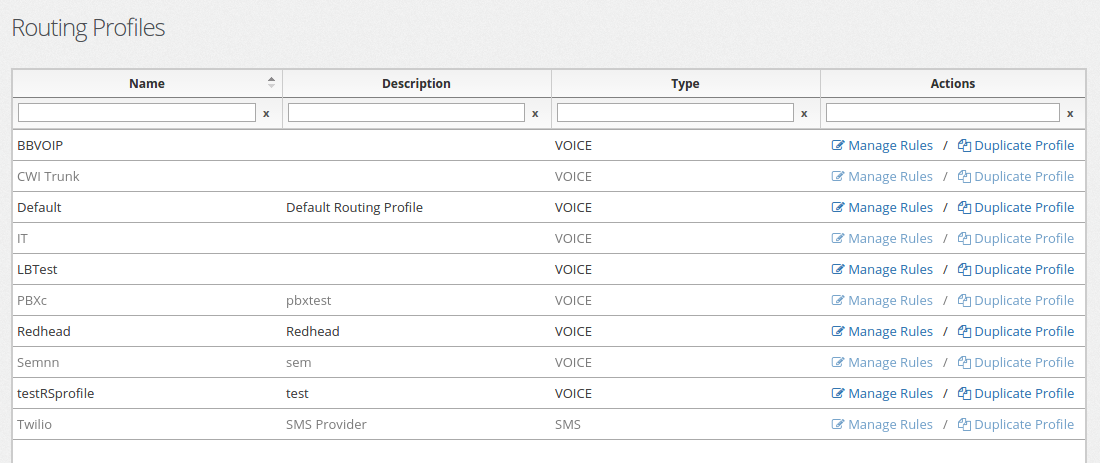
Several routing profiles can be created to match your needs. You can assign a Routing Profile to each tenant or use the same Routing Profile for multiple tenants. You can even assign a Routing Profile to a single extension.
Routing Rules
A Routing Profile is made of several rules.
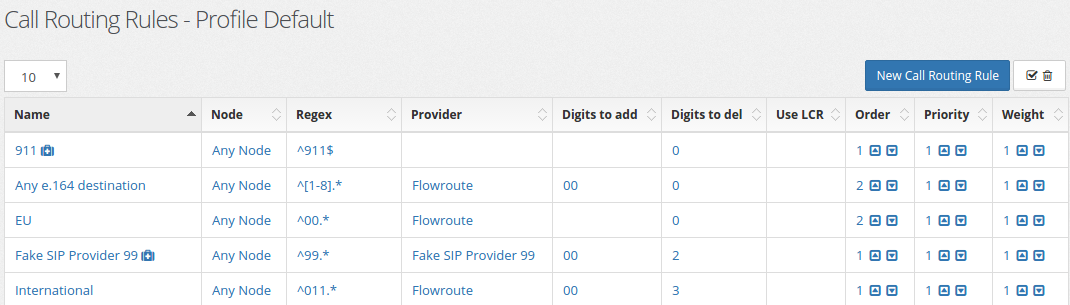
- Name : This is the name of the rule
Rule Order and keepProvider namesSelection
When acrossa tenants,number routing,is dialed, the list of routing profile matching is selected. They are ordered based on Order then for Priority. When multiple providers are selected with the same priority and provisioning.
Typical Workflow
Weighted Round Robin Example
Let's make a simple example on how to round robin between two providers.

In this case we have two providers, Flowroute and SoTel. They have exactly the same matching rule and the same Order and Priority. When dialing a number matched by the Regex, which provider will be used? It will be used the Provider with the lesser penalty. After a call, the penalty for that provider will be increased, so at the next round, the other provider will be used.
This works perfectly when we want to use a perfect round robin, but let's make an example, just imagining I want to send more calls to Sotel than to Flowroute. Mind for example I want to sent 10 calls to Sotel and only the1 requiredto optionsFlowroute. first.
Least Cost Routing (LCR)
LCR can be enabled for a destination. In this case the call is routed using the provider with the lower price for that destination. It is important to notice the cost match is made without applying the Add Digits/Del Digits.
Creating and reopenEditing ita to verify the stored values.
Documentation ExampleProfile
For documentationthe setup steps and testing,profile usetypes, namessee prefixedCreate withand DocsEdit DemoRouting Profile. Existing PBX nodes should be reused as examples; do not create additional nodes unless the deployment actually requires them.