
Create and Edit DIDs
Use Create and Edit DIDs to add or maintain inbound numbers for the selected tenant. The same form is used for new DIDs and existing DIDs: a new DID starts with tenant defaults, while an existing DID opens with the saved values.
The screenshots use the Canistracci Oil tenant.
Creating and editing
| Action | Description |
|---|---|
| Create | Open Configuration > DIDs and select New DID. Fill the required fields and select Save. |
| Edit | Open an existing DID from the DIDs list. Update the required fields and select Save. |
| Delete | When delete permission is available, open the DID and select Delete, or delete selected rows from the list. Confirm only after checking destinations and call-flow references. |
Information
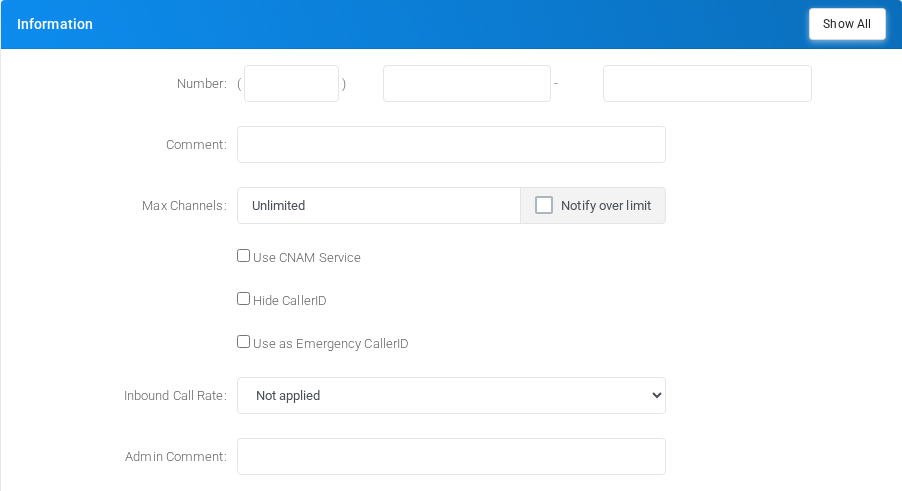
Use this section for the DID identity, channel limits, privacy behavior, emergency caller ID behavior, branch or department classification, inbound call rate, provider, and administrator notes.
| Block | Purpose |
|---|---|
| Number | Sets the DID number. Depending on system format settings, the number can be entered as country, area, and number fields or as a single value. |
| Comment and admin comment | Stores visible and internal notes for list views and administration. |
| Max Channels | Limits simultaneous use of the DID. Empty means unlimited; zero disables usage. |
| CNAM and privacy | Controls caller-name lookup and whether inbound caller ID is hidden. |
| Emergency caller ID | Marks the DID for emergency caller ID use and stores emergency notes when enabled. |
| Branch, department, rate, and provider | Classifies the DID and links it to inbound rating or DID provider data when those options are available. |
Voice
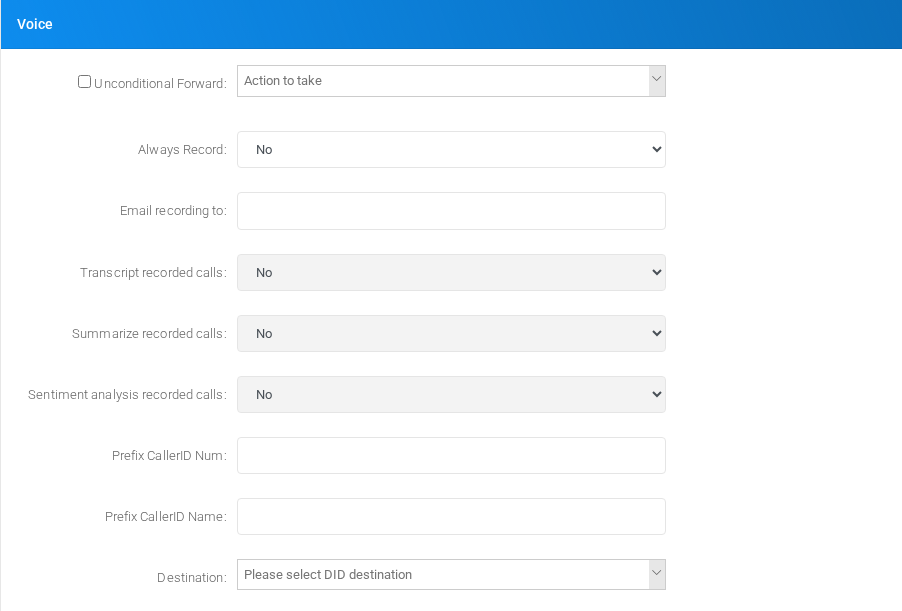
Use this section for voice-call forwarding, recording, caller ID prefixes, and the main inbound destination.
| Block | Purpose |
|---|---|
| Unconditional Forward | Routes all inbound calls to the selected destination when enabled. |
| Recording | Controls whether inbound calls are recorded and whether callers or called parties can start or stop recording. |
| Email recording and minimum size | Sends matching recordings to configured recipients and suppresses very small recordings when a minimum size is set. |
| Transcript, summary, and sentiment | Enables AI processing for recorded calls when the tenant supports those services. |
| Caller ID prefixes | Adds prefixes to inbound caller ID number or name before the call is delivered. |
| Destination | Selects the normal inbound destination for calls to the DID. |
Fax
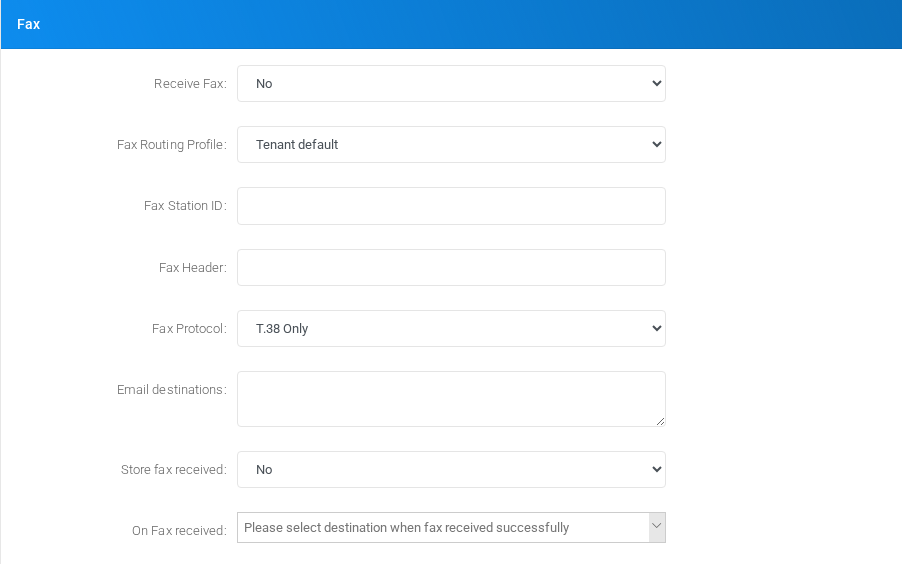
Use this section for inbound fax detection, fax routing, store-and-forward behavior, direct print or storage destinations, fax identity, and post-receive actions.
| Block | Purpose |
|---|---|
| Receive Fax | Controls whether the DID never receives faxes, autodetects faxes, forces fax handling, stores and forwards, or sends faxes to print/storage. |
| Fax Routing Profile | Selects the routing profile used for outbound faxes when this DID is used as caller ID. |
| Forward or print/storage target | Sets the forwarding number or external print/storage target used by the selected fax mode. |
| Fax station and header | Sets the station ID and header text shown on fax documents. |
| Fax Protocol | Selects T.38, G.711, or mixed fax protocol behavior. |
| Email, store, and success destination | Controls fax delivery by email, whether received faxes are stored, and where the call continues after a successful fax. |
SMS
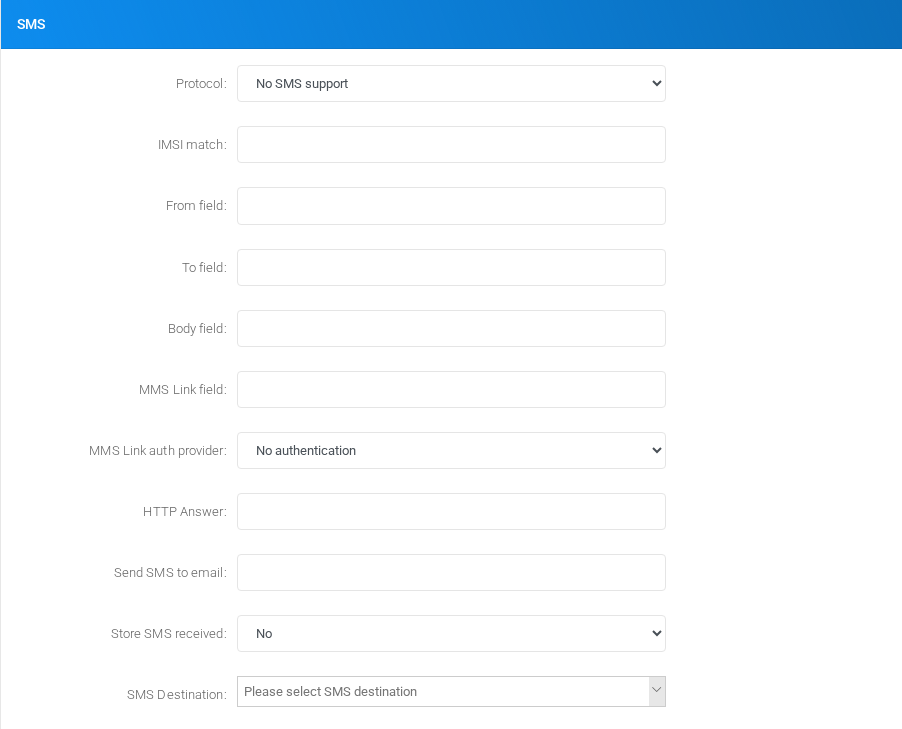
Use this section for SMS reception protocol, message field mapping, message delivery, storage, and routing destination.
| Block | Purpose |
|---|---|
| Protocol | Selects whether the DID supports SMS and how inbound SMS data is received. |
| IMSI and field mapping | Maps inbound SMS source, destination, body, and MMS link fields for custom payloads. |
| Email and store | Controls notification delivery and whether messages are stored. |
| Destination | Selects the destination used when an inbound SMS is received. |
Third party integration - Additional fields

Use this section for additional tenant-specific or integration-specific DID fields. The visible fields depend on the enabled integrations and custom template options.