
Overview
The Media Files page stores prompts and audio files used by IVRs, queues, DISAs, announcements, music-on-hold lists, and other call flows. Open it from Configuration > Media Files.
The page works against the tenant currently selected in the top bar. The screenshots and demo rows were captured in the Canistracci OIL tenant.
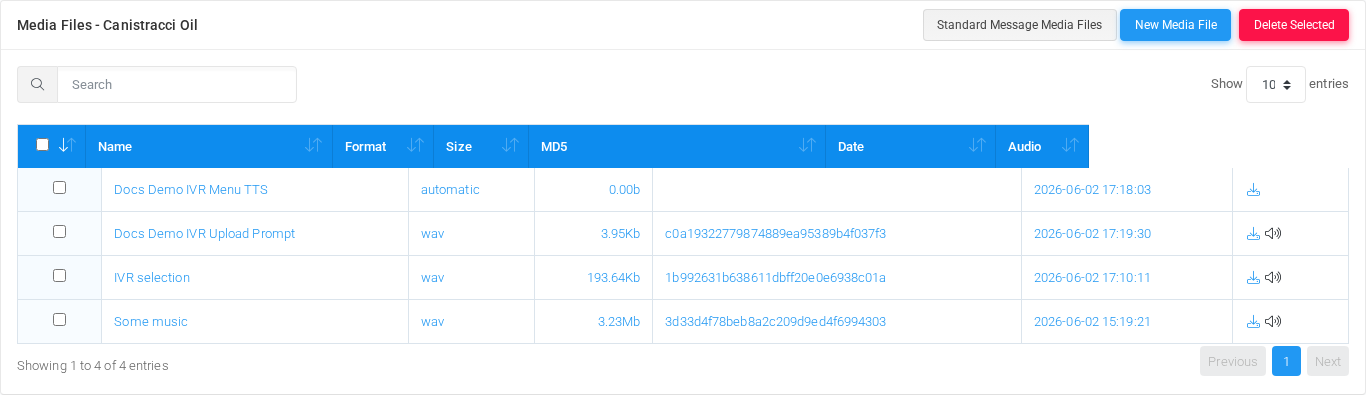
Page functions
| Action | Description |
|---|---|
| Standard Message Media Files | Opens the standard prompt assignment page, where predefined system prompts can be associated with existing media files. |
| New Media File | Opens the creation form for a new media file. From that form you can upload an audio file, create a text-to-speech prompt, or record by dialing an extension or external number. |
| Delete Selected | Deletes the selected media files after confirmation. Check IVRs, queues, DISAs, music-on-hold lists, and other call flows before deleting a prompt that may be in use. |
| Search | Filters the visible rows by name, format, size, checksum, date, or other displayed text. |
| Sort | Sorts the table by the selected column. |
| Page size | Changes how many media files are shown per page. |
| Audio download | Downloads the stored media file from the row's Audio column. |
| Audio playback | Opens the in-page media player when the stored format can be played directly by the browser. |
List columns
| Column | Description |
|---|---|
| Select | Selects one or more rows for bulk deletion. |
| Name | Display name used when selecting the prompt in IVRs, queues, destinations, and other configuration pages. |
| Format | Stored audio format, or the configured text-to-speech creation mode when no stored audio file exists yet. |
| Size | Stored media size. Dynamic text-to-speech prompts can show zero bytes because audio is generated during the call. |
| MD5 | Checksum of the stored audio file. This is blank when the media file has no stored audio body. |
| Date | Last media-file creation or update timestamp. |
| Audio | Download and playback actions for the media file. |
Common workflows
| Workflow | Use it when |
|---|---|
| Upload a Media File | You already have a WAV, MP3, M4A, or WMA file to use as a prompt. |
| Create a Media File with Text to Speech | You want MiRTA PBX to synthesize the prompt from text, either immediately or dynamically during the call. |
| Record by dialing out | You want MiRTA PBX to call an extension or external number and record the spoken audio from that call. |
| Edit an existing media file | Open the row by selecting its name, format, size, checksum, or date, then update the relevant form blocks and save. |
Demo records
The Canistracci OIL tenant contains these documentation examples: Docs Demo IVR Upload Prompt, Docs Demo IVR Menu TTS, IVR selection, and Some music.
Deleting records
Before deleting a media file, check every call flow that can reference prompts: IVRs, queues, DISAs, hunt lists, custom destinations, music-on-hold lists, and standard messages. MiRTA PBX asks for confirmation before the delete is submitted.