
DID - number of inbound channels
The DID - number of inbound channels type matches when a selected DID has more than the configured number of inbound channels in use.
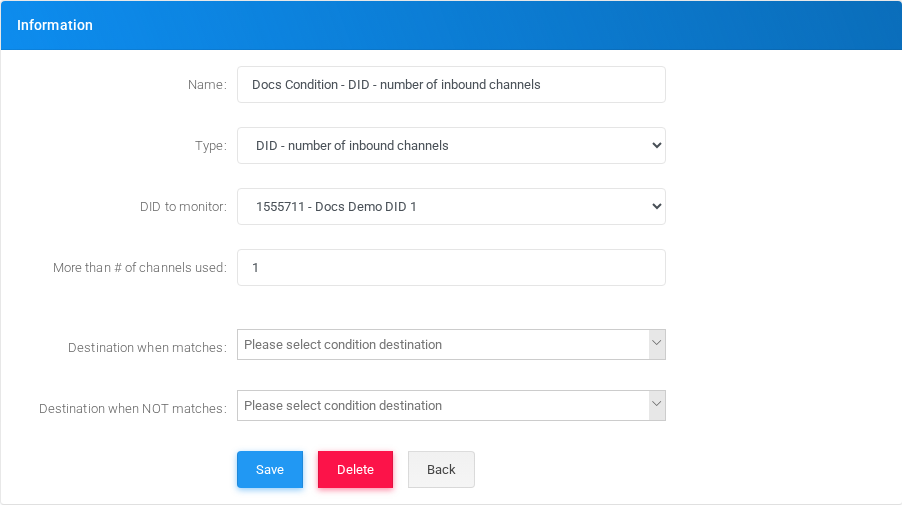
Open Configuration > Conditions, select New Condition, enter a name, choose DID - number of inbound channels in the Type field, complete the type-specific fields, and select Save.
Fields
| Field or option | Description |
|---|---|
| Name | Display name used in condition lists and selectors. |
| Type | Select DID - number of inbound channels. |
| DID to monitor | DID whose inbound channel usage is checked. |
| More than # of channels used | Inbound channel threshold. |
Example
| Field | Example value |
|---|---|
| Name | Docs Condition - DID Channels |
| DID | Docs Demo DID 1 |
| More than | 1 |
Destinations
For tenant conditions, select the destinations that should run when the condition matches and when it does not match. Global conditions are referenced by tenant-level Use a Global Condition records.
Editing and deleting
To edit this condition, open Docs Condition - DID - number of inbound channels from the Conditions list, adjust the fields, and select Save. Before deleting it, check IVRs, schedules, routes, feature codes, and other call-flow objects that may reference it.