
Change the CallerID of the extension when dialing out
This example is written for the Canistracci OIL tenant. Create the objects with a Docs Demo prefix, test them on non-production numbers, and then adapt the same structure for the production tenant.
You may have the need to call out using different CallerID, some of them may be not even defined in the system. There are multiple ways to do it, let's review them:
Use CallerID regex
If you have some "rules" for choosing the CallerID, you may use the CallerID regex located in the DIDs screen

and then associate the Outbound CallerID regex created to your extension. This way you can use an Italian CallerID number when dialing a number starting for 39 or use an American number when dialing a number starting for 1
Use Forward To custom destination with a feature code
You can start by creating a custom destination "Forward To" setting the forward number to the special variable ${PARAM1} and picking up or editing the CallerID for each one of your custom CallerID
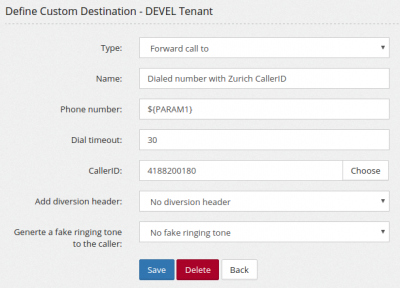
Then you'll create a different feature code for each one of your custom destinations
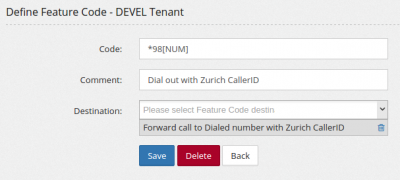
Use a feature code
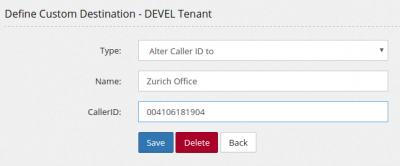
You can easily create a feature code for each of your custom CallerID. Start by creating a Custom Destination, type "Alter CallerID number" for each one of your custom CallerID
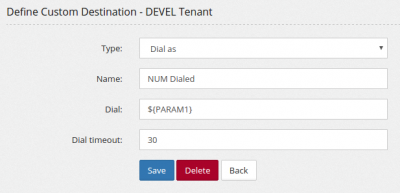
then create a Dial As feature code to just dial out with the dialed number
and then define a feature code to dial out by using them
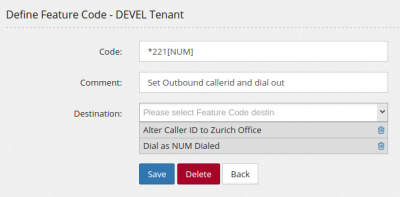
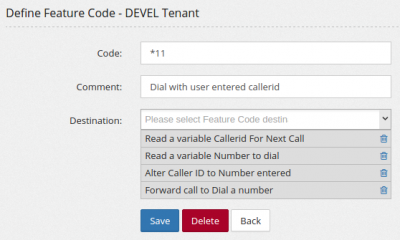
Read the CallerID from the client
You can do even a further customization, having the system asks for the CallerID to be used for the call and the number to dial.
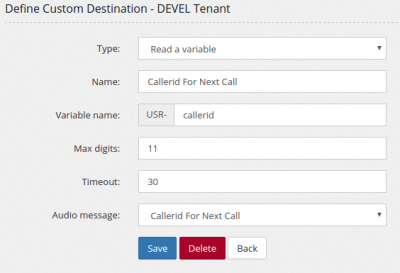
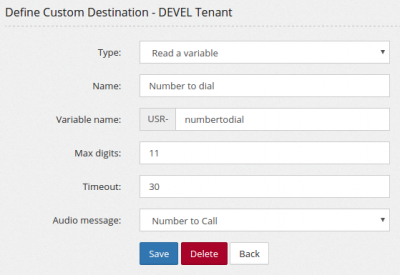
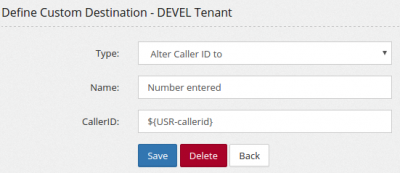
Then mix all together in a feature code
No comments to display
No comments to display