
GeoIP and Fail2Ban Filters
Configure country filters, rate limits, Fail2Ban behavior, and blocked or trusted addresses.
Use Admin > GeoIP and Fail2Ban Filters to manage geoip and fail2ban filters.
This page is a starting point for administrators: review existing records, add only the objects needed by the deployment, and keep names consistent across tenants, routing, and provisioning. The source form exposes these main blocks or fields: GeoIP allowed countries, Locate IP Address, Enable VoIP Fail2Ban, Enable web interface Fail2Ban, Fail2Ban max attempts, Notify ban activity, Notify address, Notify sender address.
Typical Workflow
Documentation Example
For documentation and testing, use names prefixed with Docs Demo. Existing PBX nodes should be reused as examples; do not create additional nodes unless the deployment actually requires them.
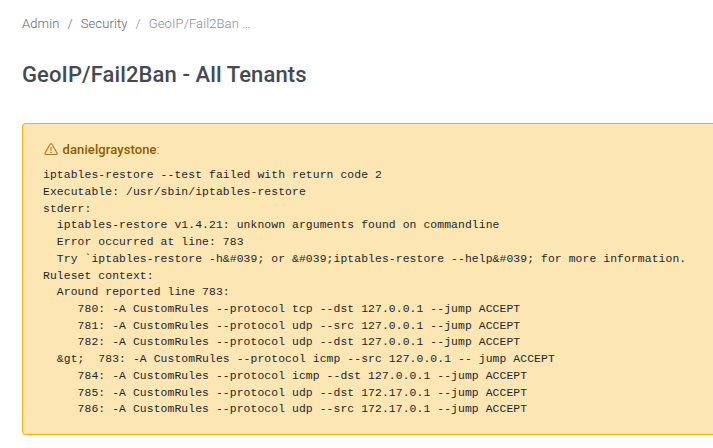
Errors reported
The checkgeoipf2b.php script can report an error if the configuration data is incorrect, like in this case, when there is an extra space in the -- jump ACCEPT string.
Main Fields
| Field or block | Purpose |
|---|---|
| GeoIP allowed countries | Review this value in relation to the object being configured and the tenant or system scope where it is used. |
| Locate IP Address | Review this value in relation to the object being configured and the tenant or system scope where it is used. |
| Enable VoIP Fail2Ban | Review this value in relation to the object being configured and the tenant or system scope where it is used. |
| Enable web interface Fail2Ban | Review this value in relation to the object being configured and the tenant or system scope where it is used. |
| Fail2Ban max attempts | Review this value in relation to the object being configured and the tenant or system scope where it is used. |
| Notify ban activity | Review this value in relation to the object being configured and the tenant or system scope where it is used. |
| Notify address | Review this value in relation to the object being configured and the tenant or system scope where it is used. |
| Notify sender address | Review this value in relation to the object being configured and the tenant or system scope where it is used. |
| Whitelisted IPs | Review this value in relation to the object being configured and the tenant or system scope where it is used. |
| Autowhitelist from Tenants IP Restrictions | Review this value in relation to the object being configured and the tenant or system scope where it is used. |
| Autowhitelist from Tenants IP Registration | Review this value in relation to the object being configured and the tenant or system scope where it is used. |
| Allow SIP connections from only Allowed IP | Review this value in relation to the object being configured and the tenant or system scope where it is used. |
| Block known SIP scanners - Edit | Review this value in relation to the object being configured and the tenant or system scope where it is used. |
| SIP Scanners | Review this value in relation to the object being configured and the tenant or system scope where it is used. |
| Blocked IPs | Review this value in relation to the object being configured and the tenant or system scope where it is used. |
No comments to display
No comments to display