
Overview
Use Admin > Users to create and maintain MiRTA PBX web administrator and operator accounts. These accounts control access to the administration interface; they are separate from SIP extensions and extension web-panel accounts.
The page is available to users with the Has menu Admin/Users privilege. The records and selectable values shown to an administrator are further limited by tenant, reserved-profile, routing-profile, call-rate, and user-profile privileges.
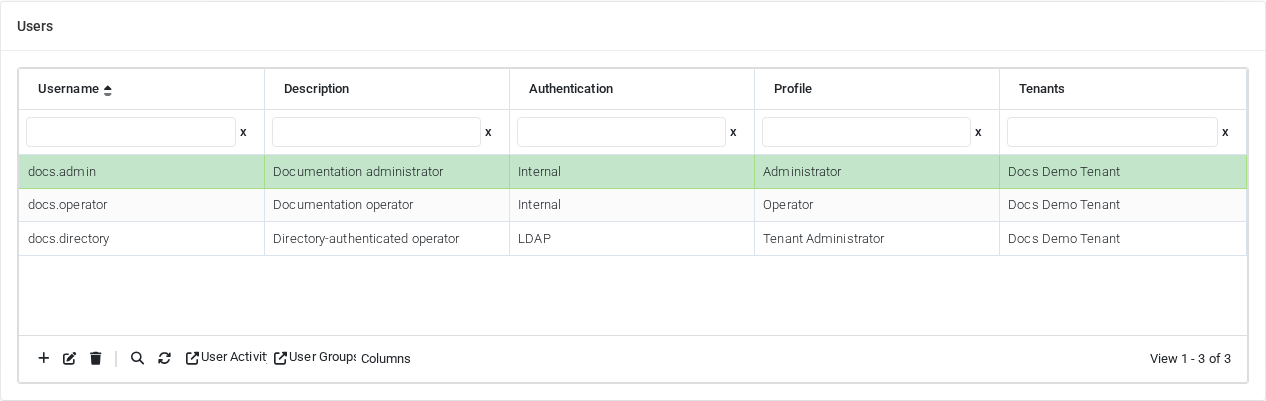
The screenshot was captured from the current MiRTA PBX server. The displayed users and tenant are fictional documentation values inserted only in the browser; no PBX records were changed.
User list
The grid initially shows the account identity, authentication method, assigned profile, and allowed tenants. Select a row before using actions that operate on an existing account.
| Column | Description |
|---|---|
| Username | Unique login name used to access the MiRTA PBX web interface. |
| Description | Administrative description of the account or its owner. |
| Authentication | Internal uses the password stored by MiRTA PBX. LDAP authenticates the user through the configured LDAP service. |
| Profile | Primary user profile that supplies menus and privileges. |
| Tenants | Tenants the account is allowed to access. |
Select Columns to show or hide additional account properties, including Email, Profile ID, LDAP settings, IP-filter state, 2FA type, password-expiration state, password lock, dynamic-IP permission, and token validity. The column choice is retained in the current browser.
List actions
| Action | Purpose |
|---|---|
| Add | Opens Define User for a new web account. |
| Edit | Opens the selected account in Define User. |
| Delete | Deletes the selected account after confirmation, subject to tenant and reserved-profile privileges. |
| Search | Searches the user list. When advanced filters are enabled, multiple conditions can be combined. |
| User Activity | Opens the user activity log. With a row selected, the log is filtered to that user; without a selection, it shows all accessible activity. |
| User Groups | Opens user-group administration. This action is shown only with the Can manage the User Groups privilege. |
| Columns | Opens the column chooser and stores the selection in the browser. |
Which users are visible
| Privilege | Effect |
|---|---|
| Can edit all tenants | Allows the administrator to view and manage user accounts across all tenants. |
| Can edit own tenants | Limits the list to accounts assigned to at least one tenant also available to the current administrator. |
| Can manage reserved profile users | Allows accounts using reserved user profiles to be displayed and maintained. |
Define User: information and authentication
| Field or option | Purpose |
|---|---|
| Username | Required unique login name. MiRTA PBX checks that the name is not already in use. |
| Description | Free-form administrative description. |
| Address used for password emails and email-based two-factor authentication. | |
| Password | Local password for an internally authenticated account. Leave it empty while editing to keep the existing password. Generate creates a suggested password. |
| Send Email | Sends the create/update user email template with the new credentials. A new password and valid email address are required. |
| LDAP | Uses LDAP instead of the local password and disables local password entry. |
| Custom LDAP user | Optional custom LDAP user connection string for this account. |
| Never expire | Exempts the local password from the expiration period configured in Admin Settings. |
| Password expiration date | Shows the calculated expiration date and whether a change is due. It is informational and depends on the global password-expiration setting. |
| Force password change at login | Requires the user to replace the local password at the next login. |
| Lock password, user cannot change it | Prevents the account holder from changing the password. |
| Last successful login | Shows the most recent successful login time for an existing account. |
| Login status | Shows whether inactivity housekeeping disabled the account. Select Re-enable on save to reactivate it. |
| Allow change of IP in the same session | Allows an authenticated browser session to continue when the client IP address changes. Leave disabled unless mobile or changing networks require it. |
| User Profile | Primary privilege profile that determines the menus and operations available to the user. |
Some fields can be shown, hidden, unavailable, prefilled, or locked through Admin > New Items Defaults. Administrators with the corresponding override privileges can reveal or edit those fields.
Resource assignments
| Field | Purpose |
|---|---|
| Tenants | Defines which tenant records and tenant-level pages the account can access. |
| Allowed Routing Profiles | Defines which voice, SMS, and fax routing profiles the user can select when maintaining permitted objects. |
| Allowed Call Rates | Defines which client call-rate tables the user can select. |
| Allowed User Profiles | Defines which profiles the user may assign when creating or editing other accounts. |
The available choices depend on the privileges of the administrator performing the edit. A tenant-limited administrator cannot grant access to resources that the administrator cannot use.
Restrictions
Restrictions narrow access inside the assigned tenants. Select only the permitted objects. Leaving a restriction list empty means that the user is not restricted by that list.
| Field | Purpose |
|---|---|
| Restricted to Queues | Limits queue pages, queue status, and queue-related information to the selected queues. |
| Restricted to Extensions | Limits extension-related pages and information to the selected extensions. |
| Restricted to Providers | Limits provider-related pages and information to the selected providers. |
Additional security
| Field or option | Purpose |
|---|---|
| Use IP Filter | Restricts login to the addresses and IPv4 networks in Allowed IP list. Test the list before enabling it for the only administrator account. |
| Allowed IP list | Enter IPv4 addresses or CIDR networks. Whitespace, commas, and semicolons can separate entries; # starts a comment. An address without a prefix is treated as a single host. |
| Use Two Factors Authentication (2FA) | Selects no 2FA, a code sent by SMS, a code sent by email, or Google Authenticator. |
| Mobile phone number | Destination used when SMS two-factor authentication is selected. |
| Secret code | Secret used by Google Authenticator. Get generates a secret and QR code. |
| Autogenerate | Defers Google Authenticator secret generation and enrollment until login. |
Save, delete, and related actions
- Save stores the account and its tenant, routing-profile, call-rate, user-profile, and restriction assignments.
- Delete removes the account after confirmation when the current administrator has sufficient scope.
- Back returns to the Users list.
- User Quick shortcuts opens shortcut configuration for an existing account.
Security recommendation: give each administrator an individual account, assign the least-privileged profile and tenant scope required, enable 2FA, and review User Activity regularly. Before deleting an account, verify that no operational process still depends on that login.
No comments to display
No comments to display