
Date - between dates
The Date - between dates type matches when the current date/time is between a configured start and end value.
Open Configuration > Conditions, select New Condition, enter a name, choose Date - between dates in the Type field, complete the type-specific fields, and select Save.
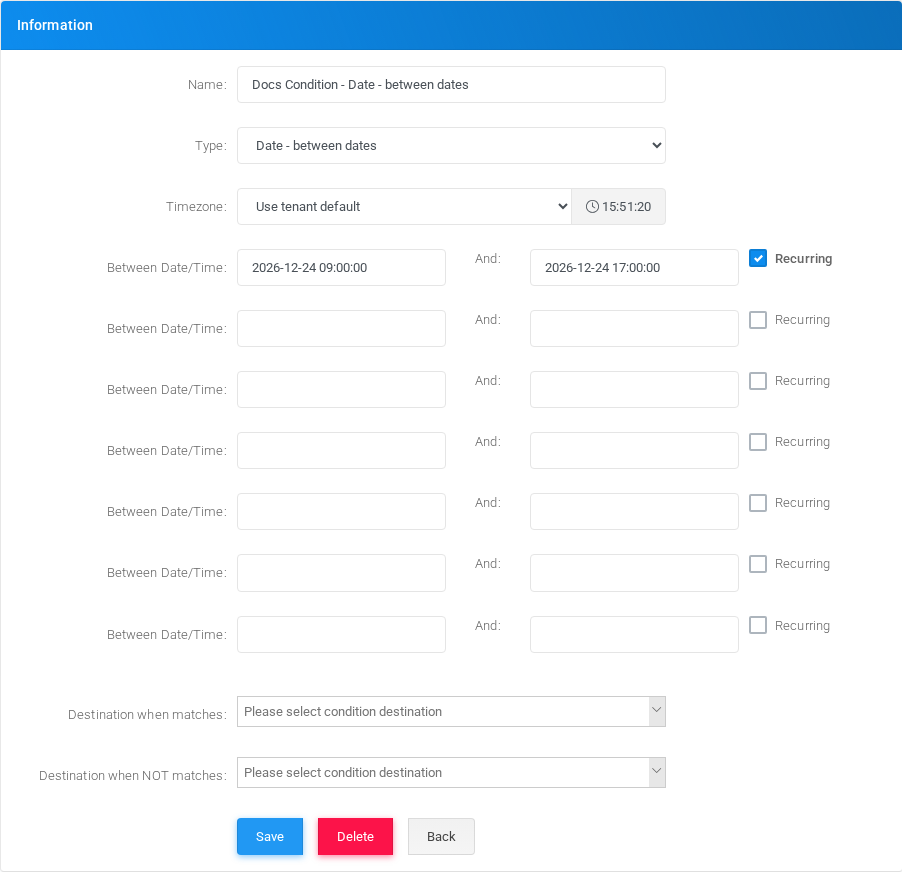
Fields
| Field or option | Description |
|---|---|
| Name | Display name used in condition lists and selectors. |
| Type | Select Date - between dates. |
| Between Date/Time | Start and end values for a matching window. Multiple windows can be configured. |
| Recurring | Treats the date window as recurring. |
Example
| Field | Example value |
|---|---|
| Name | Docs Condition - Date - Between Dates |
| Between Date/Time | 2026-12-24 09:00:00 and 2026-12-24 17:00:00 |
Destinations
For tenant conditions, select the destinations that should run when the condition matches and when it does not match. Global conditions are referenced by tenant-level Use a Global Condition records.
Editing and deleting
To edit this condition, open Docs Condition - Date - between dates from the Conditions list, adjust the fields, and select Save. Before deleting it, check IVRs, schedules, routes, feature codes, and other call-flow objects that may reference it.
No comments to display
No comments to display