
Edit PJSIP AOR
Use this page to tune the PJSIP Address of Record for a PJSIP extension. These settings control registration contact limits, contact expiration timing, mailbox subscription hints, and Path support. The screenshots use the Canistracci Oil demo PJSIP extension 101 Bella Stone.
Opening and saving
| Action | Description |
|---|---|
| Open | Open Configuration > Extensions, edit a PJSIP extension, then choose the AOR detail link. |
| Edit | Update the required fields and select Save. The form returns to the PJSIP extension after saving. |
| Back | Use Back to return to the PJSIP extension without applying changes. |
Information
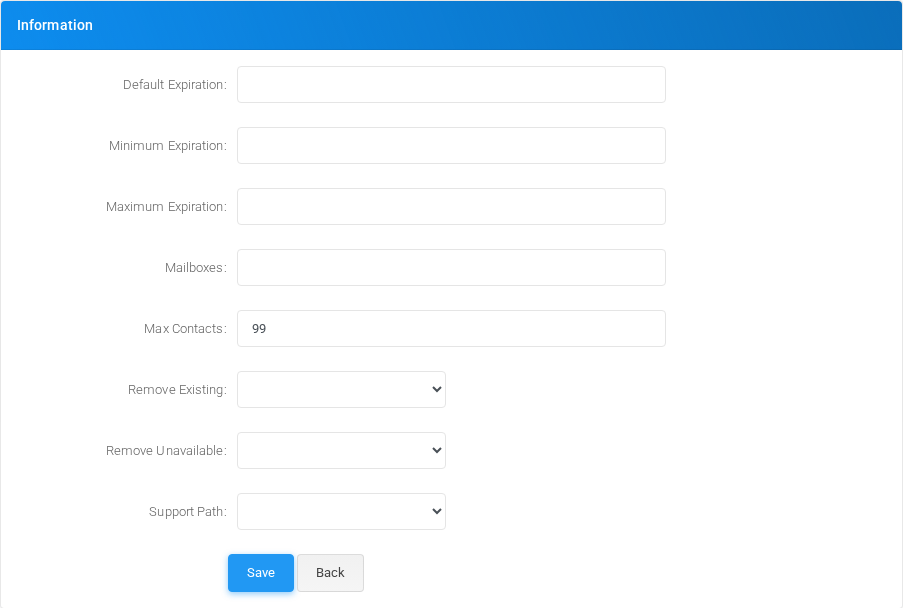
Use this section for contact expiration limits, mailbox subscriptions, maximum registered contacts, registration contact cleanup, and Path support.
| Field or option | Purpose |
|---|---|
| Default Expiration | Default expiration time in seconds for contacts that are dynamically bound to an AoR |
| Minimum Expiration | Minimum expiration time in seconds for contacts that are dynamically bound to an AoR |
| Maximum Expiration | Maximum expiration time in seconds for contacts that are dynamically bound to an AoR |
| Mailboxes | Allow subscriptions for the specified mailbox(es) |
| Max Contacts | Maximum number of contacts that can bind to an AoR |
| Remove Existing | On receiving a new registration to the AoR should it remove enough existing contacts not added or updated by the registration to satisfy Max Contacts? Any removed contacts will expire the soonest. |
| Remove Unavailable | On receiving a new registration to the AoR should it remove unavailable contacts not added or updated by the registration to satisfy Max Contacts? |
| Support Path | Enables Path support for REGISTER requests and Route support for other requests. The value is stored as ps_aors.support_path. Select System default, No, or Yes, and enable it only for registrations received through a trusted SIP proxy. |
No comments to display
No comments to display