
Overview
The Conditions page defines reusable tests for schedules, caller identity, channel usage, queue state, variables, authentication, and other routing decisions. Open it from Configuration > Conditions.
The page works against the tenant currently selected in the top bar. The screenshots and demo rows were captured in the Canistracci OIL tenant.
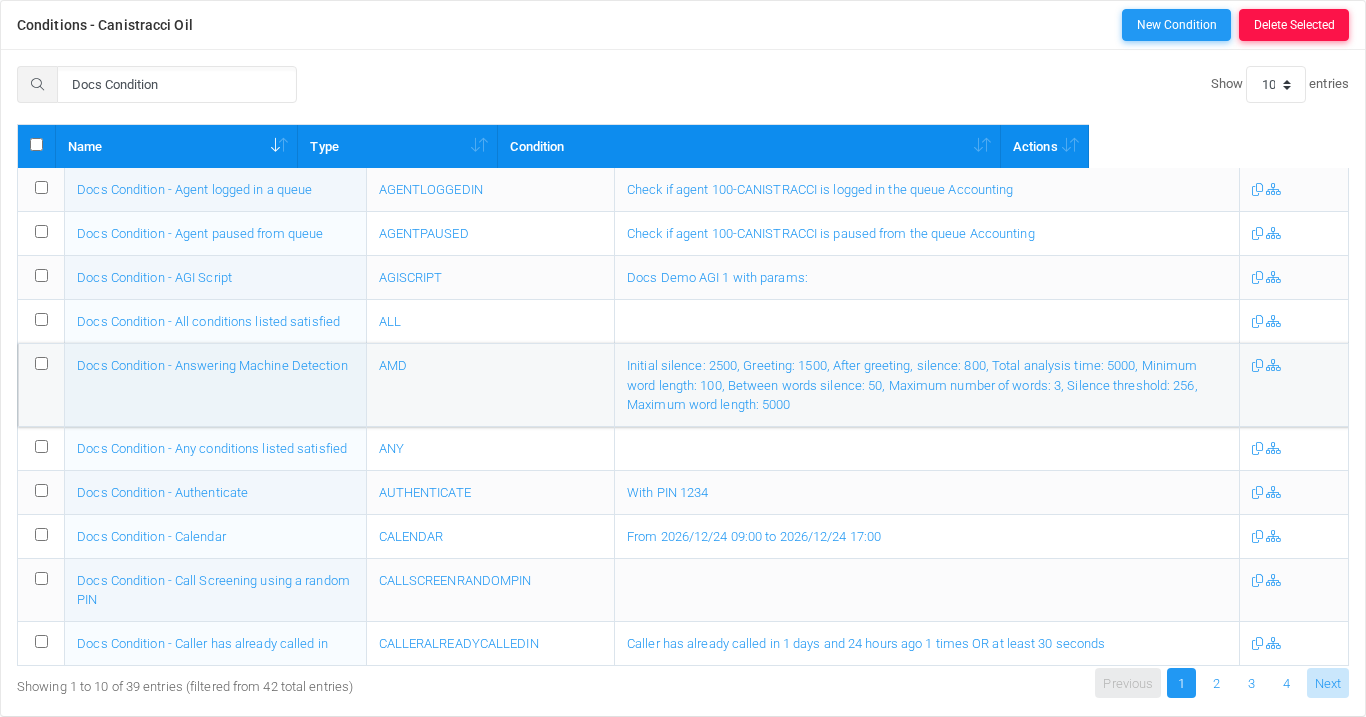
Working with conditions
| Task | How to do it |
|---|---|
| Add | Select New Condition, enter a name, choose the condition type, complete the type-specific fields, and select Save. |
| Edit | Open a condition by selecting its name in the list, change the fields, and select Save. |
| Duplicate | Use the duplicate action in the Actions column to copy an existing condition before changing it. |
| Delete | Select one or more rows and use Delete Selected, or open a condition and delete it after checking references. |
| Show flow | Use the flow action in the Actions column to inspect where the condition routes calls. |
Page functions
| Action | Description |
|---|---|
| New Condition | Opens the creation form for a new condition. |
| Delete Selected | Deletes selected conditions after confirmation. |
| Search | Filters the visible rows by name, type, condition summary, or action text. |
| Sort | Sorts the list by the selected column. |
| Page size | Changes how many conditions are shown per page. |
List columns
| Column | Description |
|---|---|
| Select | Selects a condition for bulk deletion. |
| Name | Condition display name. Select it to edit the condition. |
| Type | Condition type code used by MiRTA PBX. |
| Condition | Human-readable summary of the configured match rule. |
| Actions | Duplicate and flow-inspection actions for the row. |
Condition types
| Type | Purpose | Example record |
|---|---|---|
| Weektime | Matches weekly recurring time slots, such as business hours or after-hours periods. | Docs Condition - Weektime |
| Calendar | Matches absolute date and time ranges for holidays, maintenance windows, and one-off closures. | Docs Condition - Calendar |
| Hours | Matches one or more daily time ranges without selecting specific weekdays. | Docs Condition - Hours |
| Simple Caller ID | Matches the caller number against one or more literal values or regular expressions. | Docs Condition - Simple Caller ID |
| Simple Caller ID Name | Matches the caller name against one or more literal values or regular expressions. | Docs Condition - Simple Caller ID Name |
| Weekday | Matches selected days of the week. | Docs Condition - Weekday |
| Date - exact match | Matches one or more exact dates or date/time values. | Docs Condition - Date - exact match |
| Date - lesser than date | Matches when the current date/time is earlier than the configured date/time. | Docs Condition - Date - lesser than date |
| Date - greater than date | Matches when the current date/time is later than the configured date/time. | Docs Condition - Date - greater than date |
| Date - between dates | Matches when the current date/time is between a configured start and end value. | Docs Condition - Date - between dates |
| Day of the month | Matches a specific day number in the month. | Docs Condition - Day of the month |
| Extension status | Matches the state of one selected extension or numbered flow. | Docs Condition - Extension status |
| Variable value | Matches a tenant user variable value. | Docs Condition - Variable value |
| Multiple variable values | Matches one variable against multiple possible values, each with its own destination path. | Docs Condition - Multiple variable values |
| System variable value | Matches an Asterisk or system channel variable value. | Docs Condition - System variable value |
| Multiple extensions status | Checks the combined state of multiple selected extensions. | Docs Condition - Multiple extensions status |
| AGI Script | Runs an AGI script and compares the AGIRESULT variable with TRUE. | Docs Condition - AGI Script |
| Authenticate | Prompts the caller for a PIN and matches when authentication succeeds. | Docs Condition - Authenticate |
| Tenant - number of I/O channels (external) | Matches when the tenant has more than the configured number of external channels in use. | Docs Condition - Tenant - number of I/O channels (external) |
| Tenant - number of any channels (internal and external) | Matches when the tenant has more than the configured number of total channels in use. | Docs Condition - Tenant - number of any channels (internal and external) |
| DID - number of inbound channels | Matches when a selected DID has more than the configured number of inbound channels in use. | Docs Condition - DID - number of inbound channels |
| Number of custom group channels | Matches when a custom channel group has more than the configured number of active channels. | Docs Condition - Number of custom group channels |
| Answering Machine Detection | Runs answering machine detection and matches according to the analysis result. | Docs Condition - Answering Machine Detection |
| SIP Header | Matches a SIP header against a regular expression. | Docs Condition - SIP Header |
| Agent logged in a queue | Matches when the selected agent is logged in to the selected queue. | Docs Condition - Agent logged in a queue |
| Agent paused from queue | Matches when the selected agent is paused in the selected queue. | Docs Condition - Agent paused from queue |
| Caller ID in Phonebook | Matches when caller ID is found in a selected phone book. | Docs Condition - Caller ID in Phonebook |
| Feature code parameter | Matches parameters collected by a feature code. | Docs Condition - Feature code parameter |
| All conditions listed satisfied | Matches only when every selected condition is satisfied. | Docs Condition - All conditions listed satisfied |
| Any conditions listed satisfied | Matches when at least one selected condition is satisfied. | Docs Condition - Any conditions listed satisfied |
| Negate condition result | Matches when the selected condition does not match. | Docs Condition - Negate condition result |
| Use a Global Condition | References a global condition from the tenant configuration. | Docs Condition - Use a Global Condition |
| Check SMS message | Matches SMS message content. | Docs Condition - Check SMS message |
| Check if a specific channel is running | Checks whether a channel matching the configured attributes is currently running. | Docs Condition - Check if a specific channel is running |
| Multiple destination over weektime | Routes to different destinations based on a color-coded weekly timetable. | Docs Condition - Multiple destination over weektime |
| Call Screening using a random PIN | Screens a call by playing a prompt and asking the caller to enter a generated PIN. | Docs Condition - Call Screening using a random PIN |
| Caller has already called in | Checks recent inbound call history for the current caller. | Docs Condition - Caller has already called in |
| Caller has been called out | Checks recent outbound call history for the current caller. | Docs Condition - Caller has been called out |
| Queue Callers, more than | Matches when a selected queue has more than the configured number of callers waiting. | Docs Condition - Queue Callers, more than |
Demo records
The Canistracci OIL tenant contains one documentation example for each available condition type: 39 records with names beginning with Docs Condition -. A global example named Docs Global Condition - Weektime is also available for the Use a Global Condition type.
Deleting records
Before deleting a condition, check call flows, destinations, schedules, IVRs, feature codes, and reports that may reference it. MiRTA PBX asks for confirmation before the delete is submitted.
No comments to display
No comments to display